Password Protect and Lock Folders2.1
Publisher Description
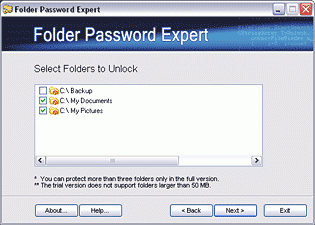
Folder Password Expert is a software program that lets you restrict access to the folders containing your sensitive data. Secure your documents, prevent people from viewing, printing, or altering them. The folder can be protected simply by right-clicking on it within Windows Explorer. The folder remains protected should your PC be rebooted into Windows Safe Mode, DOS or another operating system. Folder Password Expert can protect folders located not only on your hard drive, but also on USB external and removable drives (including USB flash drives). Folder Password Expert is ideal for notebooks. If your notebook is lost or stolen, your sensitive information will not end up in the wrong hands. Install Folder Password Expert and you have an easy way to password protect folders. Folder Password Expert lets you protect your privacy and stop others from tampering with your sensitive data.
About Password Protect and Lock Folders
This Encryption Tools program is available in English. It was last updated on 29 September, 2026. Password Protect and Lock Folders is compatible with the following operating systems: Windows.
The company that develops Password Protect and Lock Folders is Folder Password Technologies. The latest version released by its developer is 2.1. This version was rated by 5 users of our site and has an average rating of 4.4.
The download we have available for Password Protect and Lock Folders has a file size of N/A. Just click the green Download button above to start the downloading process. The program is listed on our website since 2004-07-19 and was downloaded 720 times. We have already checked if the download link is safe, however for your own protection we recommend that you scan the downloaded software with your antivirus. Your antivirus may detect the Password Protect and Lock Folders as malware if the download link is broken.
How to install Password Protect and Lock Folders on your Windows device:
- Click on the Download button on our website. This will start the download from the website of the developer.
- Once the Password Protect and Lock Folders is downloaded click on it to start the setup process (assuming you are on a desktop computer).
- When the installation is finished you should be able to see and run the program.
Program Details
System requirements
Download information
Pricing
Version History
version 2.1
posted on 2004-07-19
new release
